Understanding PacketQC
This section provides an introduction to PacketQC, explaining its purpose, how it works, and how it helps organisations strengthen their cryptographic security and prepare for the transition to post-quantum cryptography.
PacketQC’s Role in Post-Quantum Security
As quantum computing threatens widely used cryptographic algorithms, organisations must identify vulnerabilities and plan their transition to post-quantum cryptography (PQC). To support this transition, pQCee presents its Crypto-agile Defence-in-Depth (CADD) strategy, which integrates three layers of defence: understanding quantum threats, managing cryptographic vulnerabilities, and mitigating security weaknesses to achieve quantum-safe security.
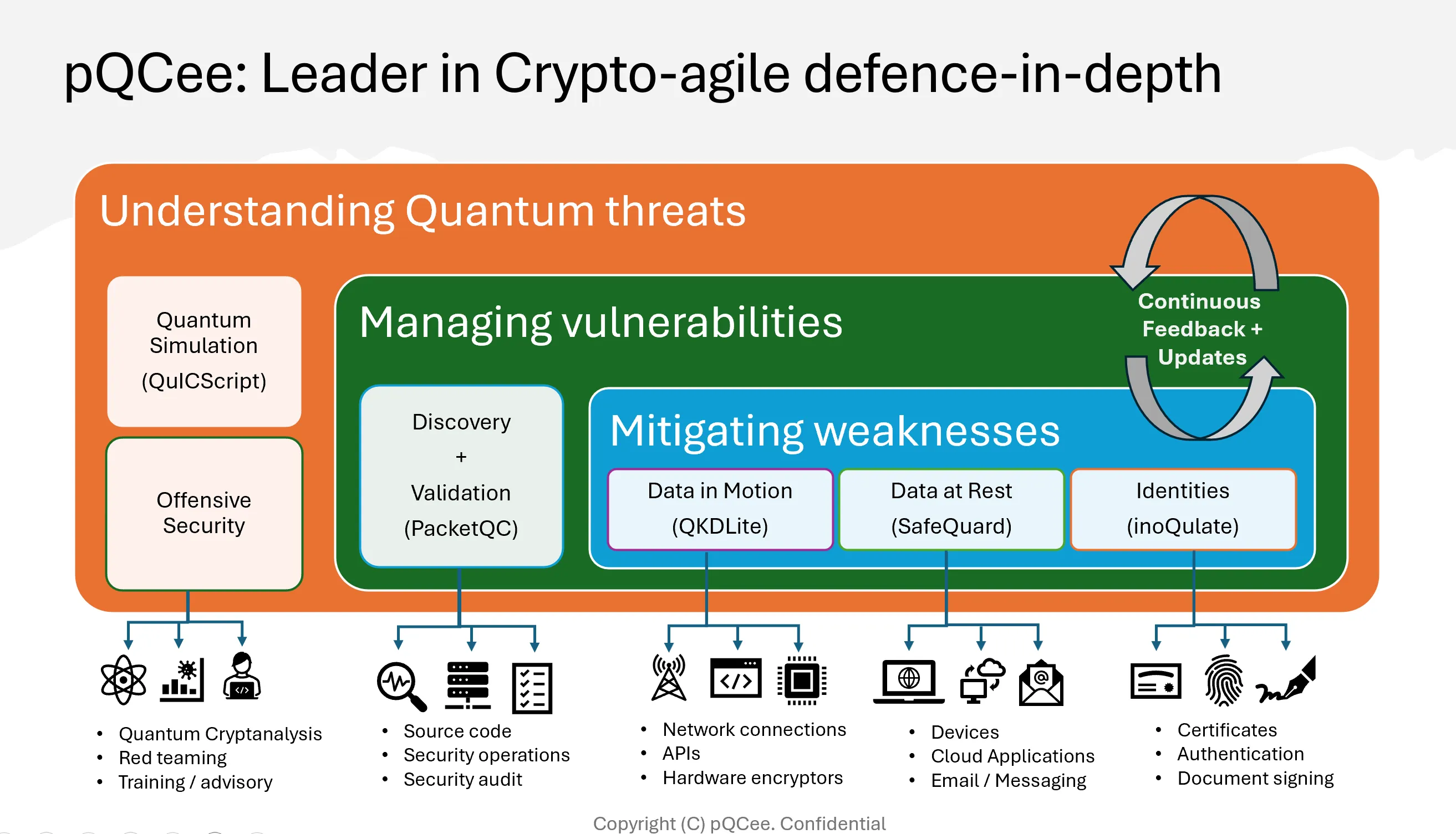
Fig. 1 pQCee’s Crypto-agile Defence-in-Depth (CADD) strategy
Within this framework, PacketQC serves as a post-quantum cryptography governance tool, supporting organisations through three core functions:
Cryptographic Validation: Validates cryptographic mechanisms used in network communications and their associated assets.
Security Assessment: Assesses the security of discovered cryptographic mechanisms against classical and quantum computing threats.
Migration Support: Provides reports and Cryptographic Bills of Materials (CBOMs) to help organisations prioritise remediation and plan their transition to PQC.
How PacketQC works
PacketQC collects and analyses cryptographic information from network traffic and asset CBOMs to help organisations identify security vulnerabilities, assess potential risks, and plan their migration to post-quantum cryptography.
The process consists of four main capabilities, as illustrated below:
        ---
config:
  flowchart:
    useMaxWidth: false

title: How PacketQC Works
---
flowchart TD

    A["Network Traffic (PCAP / PCAPNG)"]

    B@{ img: "_static/usageImgs/usage-flow-discovery.png", label: "<b>1. Cryptographic Discovery</b><br/>Identifies network connections, <br/>cryptographic mechanisms and<br/> associated assets", pos: "b", h: 250, constraint: "on" }

    C@{ img: "_static/usageImgs/usage-flow-assessment.png", label: "<b>3. Security Assessment</b><br/>Evaluates cryptographic mechanisms <br/> against configured security policies", pos: "b", h: 250, constraint: "on" }

    D@{ img: "_static/usageImgs/usage-flow-assets.png", label: "<b>2. Asset Management</b><br/>Maintains an inventory of assets <br/> and their associated CBOMs", pos: "b", h: 250, constraint: "on" }

    E["Manually Added Assets"]
    F["Uploaded Asset CBOMs"]

    G@{ img: "_static/usageImgs/usage-flow-reporting.png", label: "<b>4. Reporting</b><br/>Generates Security Reports to review <br/> findings and support remediation planning", pos: "b", h: 250, constraint: "on" }

    A --> B
    B --> C
    B --> D

    E --> D
    F --> D

    D --> C
    C --> G

    classDef input fill:#f4f6f8,stroke:#aaaaaa,color:#222222
    class A,E,F input

    classDef screenshot font-size:26px
    class B,C,D,G screenshot
PacketQC needs only a packet capture (PCAP or PCAPNG file) of your network traffic, taken with tools such as Wireshark, tcpdump or TShark. Refer to Capturing network traffic in pcap/pcapng for instructions.
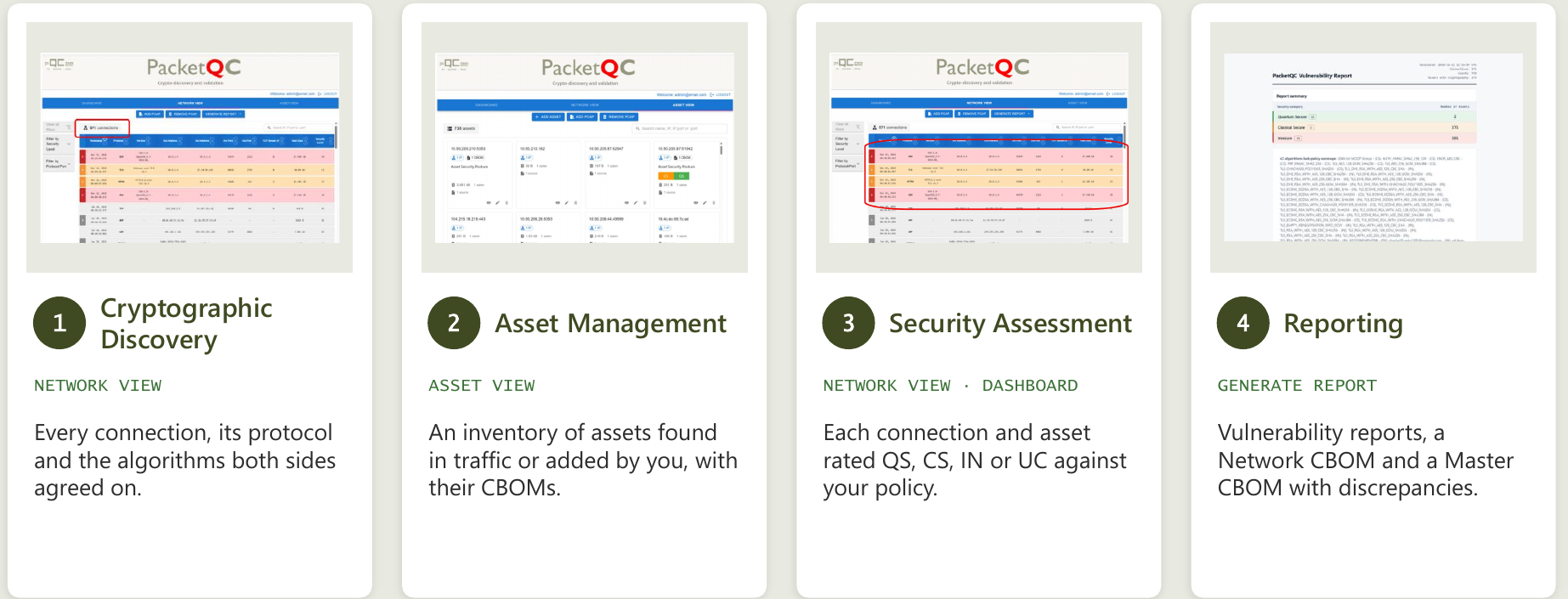
Fig. 2 Where to find each capability in PacketQC.
How PacketQC discovers cryptography
PacketQC discovers cryptography from two sources: network traffic and asset CBOMs.
Network traffic
PacketQC reads the handshake at the start of each connection, where both sides offer and agree on their algorithms. This happens before encryption starts, so no traffic is decrypted.
Protocols: TLS (including QUIC), SSH on any port, IPsec (IKEv1 and IKEv2) and RDP. Refer to Supported Protocols, Supported Algorithms and Referenced Standards.
Assets: Each address (and port) found becomes an asset in ASSET VIEW, labelled Internal or External.
Network discovery is passive and non-intrusive:
No agents: Nothing is installed on the systems being analysed.
No access to your systems: No credentials or connections are needed.
No traffic sent: PacketQC only reads capture files.
On-premises: PacketQC runs in your own environment. Refer to Install PacketQC on a Single Device.
Asset CBOMs
To include cryptography that is not visible on the network, such as inside software and libraries, upload a CycloneDX CBOM to an asset, for example from a supplier or another tool. PacketQC assesses its algorithms, and the Master CBOM and Discrepancy Report compare them with the network. Refer to Generating A Master CBOM.
How PacketQC assesses security
PacketQC rates each algorithm, connection and asset against the configured security policy, using four security levels: Quantum Secure (QS), Classically Secure (CS), Insecure (IN) and Unclassified (UC). Refer to Step 4: Security Assessment for the definitions.
Algorithms: Rated using the IANA registries and the IETF and NIST guidance in Referenced standards. The Interactive report shows the reason for each rating.
Connections: Rated by the algorithms used. If only one side of a handshake was captured, the connection takes the worst level its offers allow. Traffic without cryptography, such as ARP, is Unclassified.
Assets: An asset takes the rating of its weakest algorithm, including algorithms in its uploaded CBOMs.
Using PacketQC in your migration
A quantum-safe migration plan needs the protocols and algorithms each system uses. PacketQC provides this as CBOMs and reports, and you can capture again after each change to confirm the migration worked.
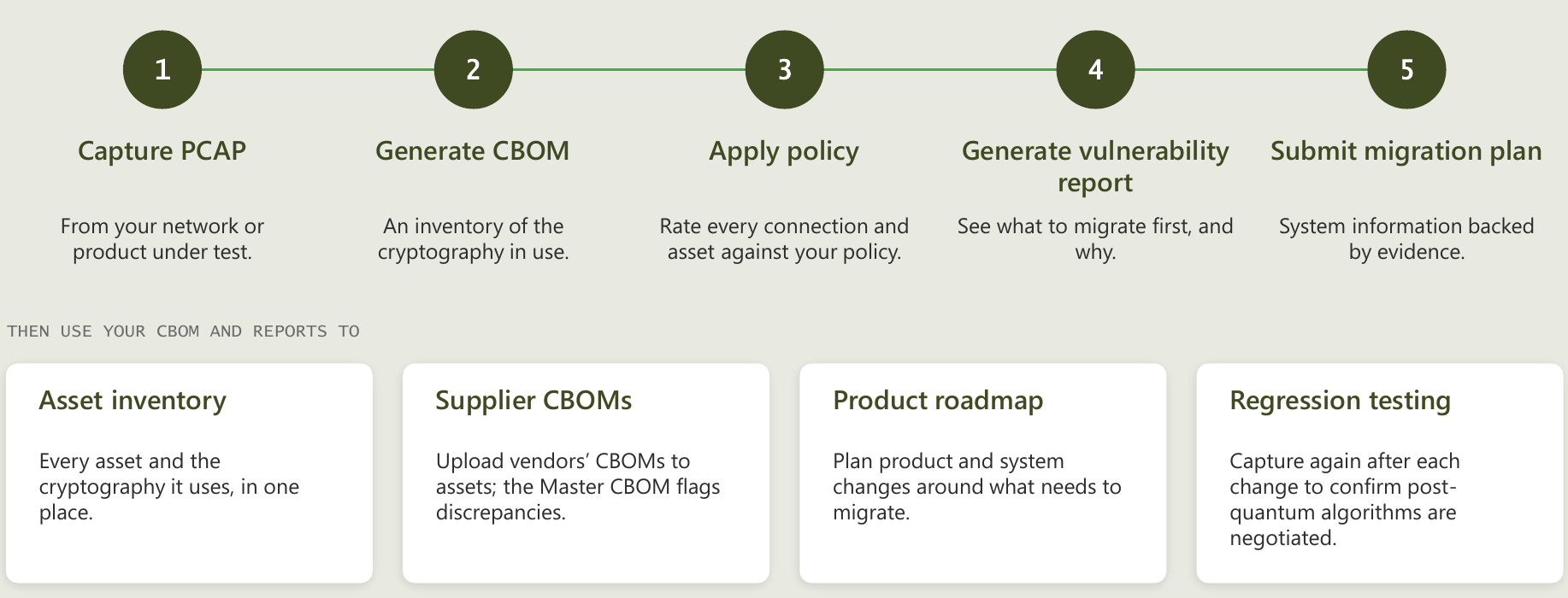
Fig. 3 Using PacketQC for quantum-safe migration.