5. QKDLite Plugin For strongSwan

5.1. Overview

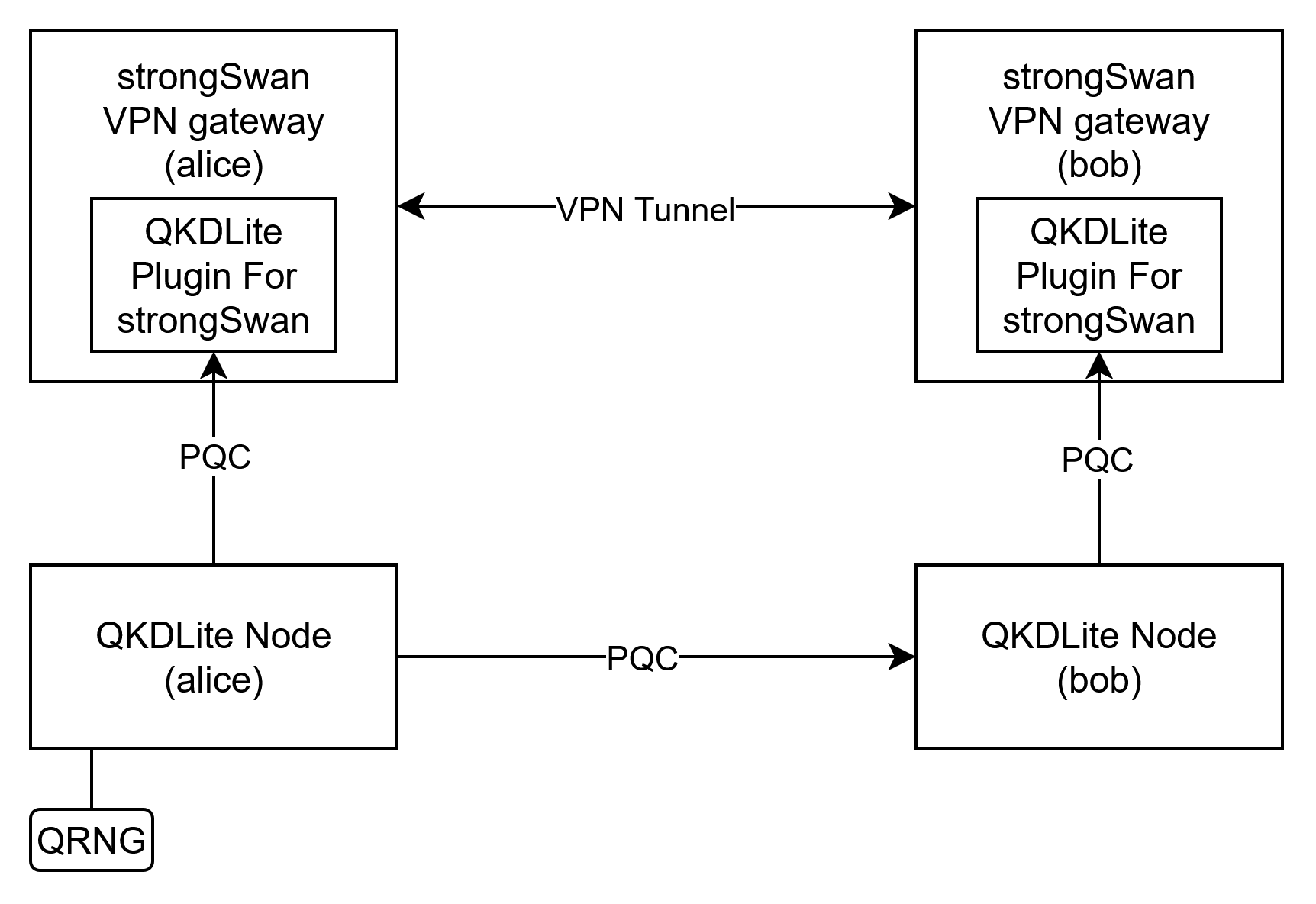
QKDLite Plugin For strongSwan provides strongSwan VPN gateways with fresh PPKs (Postquantum Preshared Key) for connections.

QKDLite Plugin for strongSwan

Fig. 5.1 QKDLite Plugin For strongSwan

QKDLite Plugin For strongSwan can be co-located together with the strongSwan gateway in a higher trust zone to provide a quantum-safe connection to the QKDLite node either locally or over the internet. As shown in diagram above, the connections from the QKDLite to the plugin are quantum-safe connections.

5.2. Prerequisite

For QKDLite Plugin For strongSwan to use quantum-safe connectons, OpenSSL 3.5 and above is required.

5.3. Installation

In this section, we will guide you on how to set up plugin for strongSwan to retrieve PPK from QKDLite ETSI API endpoint.

  1. Download and extract the QKDLite plugin for strongSwan package.

  2. Copy libstrongswan-qkdlite.la and libstrongswan-qkdlite.so in the package to the plugin directory in a strongSwan instance.

    # possible default locations:
    /usr/lib/ipsec/plugins/
    /usr/lib64/ipsec/plugins/
    /usr/lib/strongswan/plugins/
    /usr/local/lib/ipsec/plugins/
    /usr/libexec/ipsec/plugins/
    
  3. Add the following parameters in /etc/strongswan.conf or /etc/strongswan.d/ to load the plugin.

    Listing 5.1  strongswan.conf
    charon {
        ...
        plugins {
          add a qkdlite entry under plugins
          qkdlite {
                # add a global entry
                global {
                    # replace below parameters with existing ETSI API endpoint
                    # and the certs to connect to the endpoint
    
                    # https of QKDLite ETSI server
                    key_source_url = https://localhost:8080
    
                    # Paired/Remote key source ID
                    remote_key_source_id = SAE_B
    
                    # certificates to connect to the ETSI endpoint
                    cacert = /path/to/CA.crt
                    clientcert = /path/to/client.crt
                    clientkey = /path/to/client.key
                }
          }
        }
        ...
        # load the plugin in charon
        load = ... qkdlite
    }
    
  4. Restart strongSwan to load the plugin.

    Listing 5.2  bash
    systemctl restart strongswan
    
  5. Verify that the plugin is registered when starting strongSwan.

    Listing 5.3  bash
    00[CFG] QKDLite_plugin: QKDLite plugin registered
    
  6. (Optional) repeat steps above for another strongSwan instance.

5.4. Configuration

For the following guide we assume that you have 2 strongSwan instances that have installed the plugin, and you want to connect the 2 instance. We will refer the initiator instance as alice (the one who will initiate the connection), and responder instance as bob (the one who will receive the connection).

For the alice instance,

  1. Add ppk configuration for a connection in /etc/swanctl/swanctl.conf.

    Listing 5.4  swanctl.conf
    connections {
        example_connection {
          ...
          # add this line as it is
          ppk_id = qkdlite
          # To make ppk compulsory for this connection add this
          # ppk_required = yes
        }
    }
    
  2. Restart strongSwan to load the new configurations.

    Listing 5.5  bash
    systemctl restart strongswan
    

Note

To allow 2-way initiation repeat the above steps in bob instance for the connection to alice.

5.5. Connect strongSwan instances

To test that the plugin is working and can be used in connections for strongSwan:

In alice instance,

  1. Open an vpn connection to bob instance:

    Listing 5.6  bash
    swanctl --initiate --ike <example_connection>
    # or
    swanctl --initiate --child <example_child_connection>
    
  2. you should see this line:

    Listing 5.7  bash
    [CFG] using PPK for PPK_ID 'qkdlite'
    
  3. On bob instance, verify that the PPK ID is in use via:

    Listing 5.8  bash
    swanctl --log
    
  4. you should see this line within the logs:

    Listing 5.9  bash
    [CFG] using PPK for PPK_ID 'xx:xx:xx:xx:xx:xx:xx:xx:xx:xx:xx:xx:xx:xx:xx:xx'
    

    Note

    This is the PPK being used between the 2 instances, which appear on alice instance only as PPK_ID qkdlite.

  5. Verify that the connection is successfully established

    Listing 5.10  bash
    [IKE] IKE_SA example_connection[1] established between 172.30.0.3[alice@strongswan.org]...172.30.0.2[bob.strongswan.org]
    

5.6. Debugging

  1. For verbose logging, in /etc/strongswan.conf or /etc/strongswan.d/ change cfg logging to level 2 and restart strongSwan

    Listing 5.11  strongswan.conf
    charon {
      start-scripts {
        ...
      }
    
      # example config
      filelog {
          stderr {
              default = 1
              # for more verbose logs
              cfg = 2
              # ...
          }
      }
    
      # to use for charon-systemd
      charon-systemd {
          journal {
            default = 1
            # for more verbose logs
            cfg = 2
            # ...
          }
      }
    ...
    }
    

    Note

    For logging configurations refer to https://docs.strongswan.org/docs/latest/config/logging.html

  2. Repeat connecting from alice instance to bob instance:

    Listing 5.12  bash
    swanctl --initiate --ike <example_connection>
    # or
    swanctl --initiate --child <example_child_connection>
    
  3. View the verbose logs using preferred logging usage:

    Listing 5.13  bash
    # if charon-systemd journal is used
    journalctl -u strongswan
    
  4. You should be able to find the plugin logs with QKDLite_plugin:

    Listing 5.14  bash
    01[CFG] QKDLite_plugin: IKE_SA: example_connection[1]
    01[CFG] QKDLite_plugin: IKE SA SPIs - Initiator: 3ef9449c7fbade09, Responder: 3032ecb188ca62f2, initiator
    01[CFG] QKDLite_plugin: PPK requested - me: qkdlite
    01[CFG] QKDLite_plugin: Updated qkdlite PPK with PPK from xx:xx:xx:xx:xx:xx:xx:xx:xx:xx:xx:xx:xx:xx:xx:xx
    01[CFG] QKDLite_plugin: Successfully retrieved response from source: https://localhost:8000, destination: SAE_B
    01[CFG] QKDLite_plugin: Cached PPK ID for IKE_SA example_connection[1]
    

5.7. Troubleshooting Guide

5.7.1. Error: plugin requires OpenSSL 3.5 or newer!

Symptom

When starting up the plugin, swanctl returns with:

Listing 5.15  bash
[CFG] QKDLite_plugin: Error: plugin requires OpenSSL 3.5 or newer!

Likely Cause

The OpenSSL installed and configured is using an older version of OpenSSL. Verify with

Listing 5.16  bash
openssl version

Usually for newer OS versions, the latest version of OpenSSL is installed by default, but for older OS versions, building from source and install is required. To download the openssl latest version refer to: https://openssl-library.org/source/ For installation refer to: https://github.com/openssl/openssl/?tab=readme-ov-file#build-and-install

5.7.2. PPK required but no PPK found for ‘qkdlite’

Symptom

When trying to connect to another strongSwan instance, swanctl returns with:

Listing 5.17  bash
[CFG] QKDLite_plugin: Failed to retrieve PPK from server, Error code: 3
[CFG] QKDLite_plugin: Failed to retrieve PPK for 'qkdlite'
[CFG] PPK required but no PPK found for 'qkdlite'

Likely Cause

The plugin is not able to connect to the ETSI API endpoint, it could be a firewall issue, or invalid/wrong certificates between the strongSwan plugin and the endpoint. Do a basic curl to the ETSI API endpoint to verify the external cause:
Listing 5.18  bash
curl --cert /path/to/client.crt \
--key /path/to/client.key \
--cacert /path/to/CA.crt \
https://host.docker.internal:8444